Test Your Shopify Link Preview with a Free Share Image Checker
Before you share a store link widely, it helps to see the preview the way each platform will build it — the image, title and description pulled from your page's Open Graph tags. The free Social Share Preview Checker does exactly that: paste any Shopify URL and it fetches the page's live og:/twitter: tags and renders the preview card for Facebook, X/Twitter, WhatsApp, LinkedIn and more — then flags anything that would make the preview look broken. It is a free tool, no signup, and it works on any store, not just ones running our app.
Don't have Yuhu yet? Install it from the Shopify App Store →
1 Open the Share Preview Checker
Go to the Social Share Preview Checker at yuhuapps.com/tools/social-preview. You will see a single field labelled with the placeholder https://your-store.myshopify.com/products/your-product. It works on any Shopify store URL — your .myshopify.com address or your custom domain — so you do not need to install anything to try it.
![Open the Share Preview Checker — input[name="url"], button[type="submit"] highlighted](/docs-assets/img/test-shopify-link-preview-checker/01-checker-form.png?791b6648)
2 Paste a store link and check the preview
Paste a product, collection or page URL and press Check preview. The tool fetches that one page, reads its Open Graph and Twitter-card tags, and grades the result — surfacing issues like a missing og:image, a plain Shopify product photo used as the share image, or a missing title. Each issue is shown as a coloured banner so you can see at a glance whether the link is share-ready.

3 See the preview on each platform
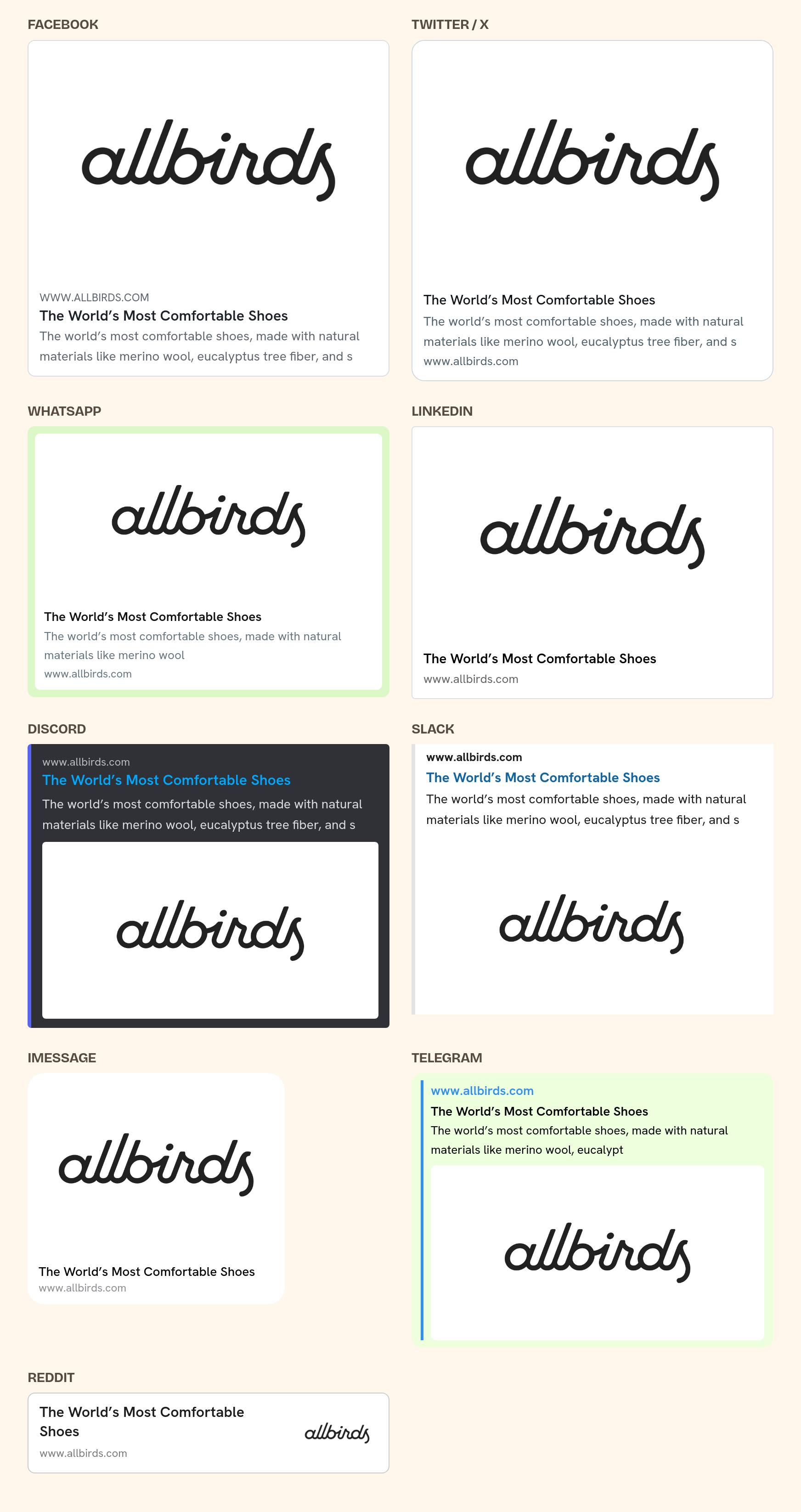
Below the grade, the tool renders the preview card for each destination — Facebook, X/Twitter, WhatsApp, LinkedIn, Discord, Slack, iMessage, Telegram and Reddit — each keeping that platform's own native card look, so what you see is close to what your customers will see. There is also a Raw tags we found panel that lists the exact og:title, og:description, og:image and Twitter-card values the page returned.
4 Fix a missing or wrong image
If the checker flags a missing or weak image, that is the og:image talking — the main tag platforms read for the preview picture. On a Shopify store, the fix is to serve a proper, branded og:image per page, which is what Social Media Share Image does for products, collections, blog articles and (once the "Change social share images for pages?" switch is on) store pages. After you enable the app's theme embed, run the same URL through the checker again to confirm the new image is being served.
5 Re-check after platforms re-scrape
Platforms cache previews per URL, so a link you already shared can keep showing an old card even after you fix the tag. The checker always reads the current tags on the page, so it shows you the real state immediately — but Facebook, WhatsApp and other platforms keep showing the card they cached until they fetch the page again. Sharing the link again or using a platform's own re-scrape/debug tool (such as Facebook's Sharing Debugger) asks for a fresh fetch, but this is best effort: when the cached preview actually refreshes is up to Facebook and WhatsApp.
Frequently asked questions
How do I test what my Shopify link looks like when shared?
Paste the URL into the free Social Share Preview Checker and press Check preview. It fetches your page's live Open Graph tags and renders the preview card for Facebook, X/Twitter, WhatsApp, LinkedIn and more, so you can see a close approximation of how the link will look before you share it.
What does the link preview checker actually read?
It reads your page's public Open Graph and Twitter-card meta tags — og:image, og:title, og:description, twitter:card and twitter:image — plus the page title and meta description. For product pages it may also read the store's public /products/<handle>.json to see the product photos.
Why does the checker say my og:image is missing?
It means the page did not return a valid og:image tag, so platforms may pick some other image from the page or show no image at all. Serving a dedicated og:image per page fixes it — Social Media Share Image generates that image and serves it through its theme app embed once you switch the embed on. With Automation on, new products and collections get one automatically, and blog articles (and store pages, once their switch is on) are picked up by an hourly sync.
Is the checker free, and do I need to install the app?
The checker is free with no signup and works on any Shopify store URL, whether or not you use our app. You only need the app if you want it to generate and serve branded share images for your store automatically.
Why does the preview still look wrong after I fixed it?
Platforms cache link previews per URL. The checker reads the current tags so it updates right away, but Facebook, WhatsApp and others keep showing the cached card until they re-fetch the page. Re-sharing the link or using the platform's own re-scrape tool can prompt a refresh, but it is best effort: when the cached card updates is up to Facebook and WhatsApp.
What is the YuhuSharePreview bot in my server logs?
That is this checker fetching the URL a person submitted. It is not a crawler — it only fetches URLs people submit, never follows links, and never visits on a schedule. It makes at most one or two requests per check, caches results for 24 hours, respects rate limits, and signs every request with RFC 9421 HTTP Message Signatures.
Which platforms does it show a preview for?
Facebook, X/Twitter, WhatsApp, LinkedIn, Discord, Slack, iMessage, Telegram and Reddit — each rendered in that platform's own card style so the preview is representative of the real thing.